Ticket Bliss: Smooth Rides Ahead
User journey improvement and process governance for a metropolitan transport app: three critical path failures, two-tier solutions, mockups
Context↑↓
This analysis covers a metropolitan transport app serving 11M+ residents. The product name is withheld.
In iterative development, each release adds functionality — but user paths can quietly accumulate friction. Features are built independently, edge cases are deferred, and gaps between flows go unnoticed until users start losing money or abandoning sessions. Regular user path analysis keeps these gaps visible and ensures the product stays usable as it grows.
Problem↑↓
A metropolitan transport app serving a city of 11.34 million people — approximately 9.1 million potential users. The app handles physical transit card management reliably. But there is a second path: tourists and occasional users who want to stay fully digital, purchasing virtual tickets directly to Apple Wallet or Google Pay without a physical card.
On this path, three critical failures make the experience unreliable enough that users abandon virtual tickets altogether and switch to physical transit cards instead. At this scale, even a small percentage of payment failures generates significant support load and erodes user trust — the cost of handling a single payment incident far exceeds the revenue from a single ticket sale.
User Profile↑↓

Visiting Paris for a long weekend. Uses his iPhone for everything — maps, payments, tickets. Has no physical transit card and no intention of getting one for a three-day trip. Buys tickets on the go: at metro entrances, on the street, often while walking. Expects a digital purchase to take under a minute.
- Buy tickets quickly without stopping
- Stay fully digital — no physical cards
- Recover from errors without contacting support

Paris resident, uses the app several times a week. Has no physical transit card — relies entirely on Apple Wallet for daily commutes. Buys tickets between meetings, often on the move. Knows the app well but keeps running into the same friction points on every purchase.
- Buy tickets fast without breaking stride
- Renew virtual tickets without losing money
- Resolve payment errors without calling support
Journey Overview↑↓
The purchase flow spans three stages. Stages 1 and 2 work. Stage 3 breaks down at three specific points — each one independently capable of losing the user.
| Step | Stage | Action | Status |
|---|---|---|---|
| 1.1–1.3 | Install | Download, install, onboard | ✅ |
| 2.1–2.4 | Login | Register with email + phone, verify | ✅ |
| 3.1–3.3 | Purchase | Select ticket type, quantity, proceed | ✅ |
| 3.4 | Purchase | Email required for receipt | ⚠️ Friction |
| 3.5–3.7 | Purchase | Review order, confirm payment | ✅ |
| 3.8 | Purchase | Add ticket to Apple Wallet | ❌ Fails |
| 3.9 | Error | No recovery path in-app | ❌ Missing |
Bottleneck Analysis↑↓
B-01. Email Required at Every Purchase
At step 3.4, the app asks for an email address to send a receipt — at every purchase, despite the user being fully logged in with a registered email.
sequenceDiagram
    participant M as Marco
    participant A as App

    rect rgb(240, 253, 250)
        M->>A: Opens app — already logged in
        M->>A: Selects ticket type
        A->>M: Enter email for receipt
        Note over M: Standing outside. Every purchase.
        M->>A: Types full email manually
        A->>M: Ticket confirmed
    end
Why it matters: The user is outside, in motion, often mid-commute. The problem is not the email itself — it is the mandatory manual entry on every purchase. Typing a full address on a mobile keyboard in these conditions takes 20–40 seconds and interrupts the flow. The email is already known from the account; re-entering it adds no value.
Interim
Remove the mandatory email field entirely. Deliver the receipt as a PDF directly to the device — no input required, no friction.
Target
Pre-fill the receipt email from the account profile. Allow the user to change it inline if needed. Make manual entry optional for logged-in users who have already consented to receive receipts.
B-02. Wallet Card Conflict — Money Charged, Ticket Lost
This bottleneck affects the virtual card path only — physical transit card management works correctly. At step 3.8, when purchasing a virtual ticket, the app attempts to create a new card in Apple Wallet. If a card from a previous purchase already exists, the operation fails — but the payment has already been processed.
sequenceDiagram
    participant M as Marco
    participant A as App
    participant W as Apple Wallet

    rect rgb(255, 243, 243)
        M->>A: Buys new ticket
        A->>W: Attempt to add card
        W-->>A: ❌ Card already exists
        A->>M: Error: cannot create new card
        Note over M: Payment already charged
    end
    rect rgb(240, 253, 250)
        Note over M: Workaround — discovered by trial
        M->>W: Manually deletes old card
        M->>A: Purchases ticket again
        A->>W: Card created ✓
    end
Why it matters: The user is charged but receives no ticket. The error message (“cannot create new card”) does not explain the cause or offer a recovery path. The workaround — delete the existing Wallet card, then repurchase — is discovered by trial and error, not by instruction. Money is at risk at every failed attempt.
Root cause: The app initiates a payment transaction without verifying the state of the external wallet beforehand. If the wallet returns an error (“pass already exists”), the charge has already been processed — leaving the user with no ticket and no recovery path.
Interim
If virtual card renewal cannot yet be handled correctly, remove it from the interface until it can. Alternatively, display a notice at step 1 — before any payment is initiated — that virtual card renewal is temporarily unavailable. Never let the user reach a payment screen for a flow that will fail.
Target
Before charging, detect whether a Wallet card already exists. If it does: offer to replace it inline with a single confirmation step. Confirm the Wallet operation will succeed before processing payment.
B-03. No Recovery Path at Point of Failure
When either bottleneck above occurs, the app offers no contextual help — no explanation, no inline FAQ, no automated triage. The user’s only option is to leave the app and search for support externally — mid-commute for a local, or in an unfamiliar city for a tourist.
Why it matters: An error in a payment flow is a high-stress moment. The app does have an automated support bot — but it does not handle critical payment errors and does not escalate to a live operator. It does not tell the user who to contact for payment issues or how to request a refund — the two questions every user with a failed charge will ask first.
Interim
Add static prompts for known financial error types. For each: a plain-language explanation, a pre-filled email template for contacting support, a phone number or office address for in-person resolution. No development complexity — static content is enough to unblock the user.
Target
Add in-app purchase history for self-service receipt and ticket recovery. Upgrade the bot to classify payment errors and escalate to a live operator when needed. Ensure every unresolved payment error ends with a clear next step — not a dead end.
Proposed Solution↑↓
The mockups below visualise all three recommendations as screen-level changes — without restructuring the existing flow.
As-Is
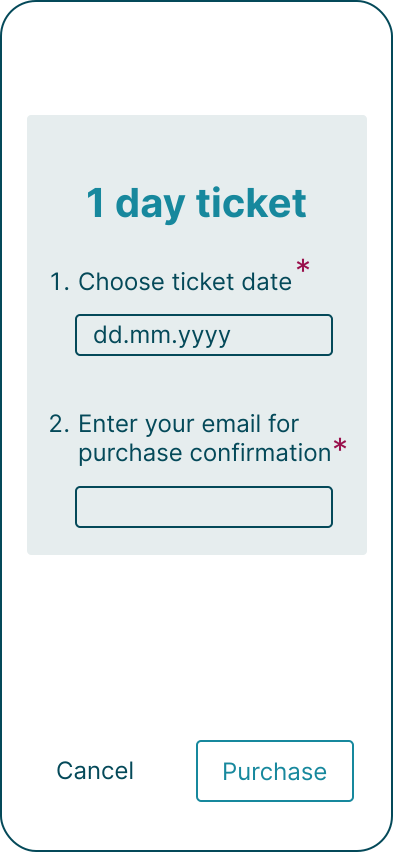
Current state
To-Be
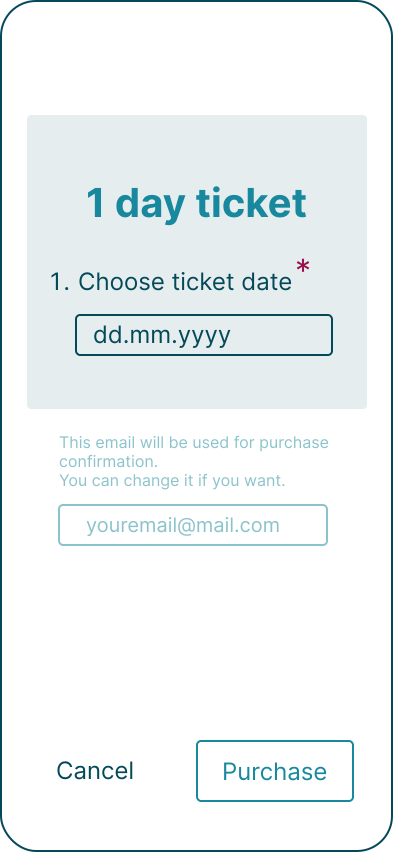
B-01 — Email pre-filled

B-02 — Wallet confirmed
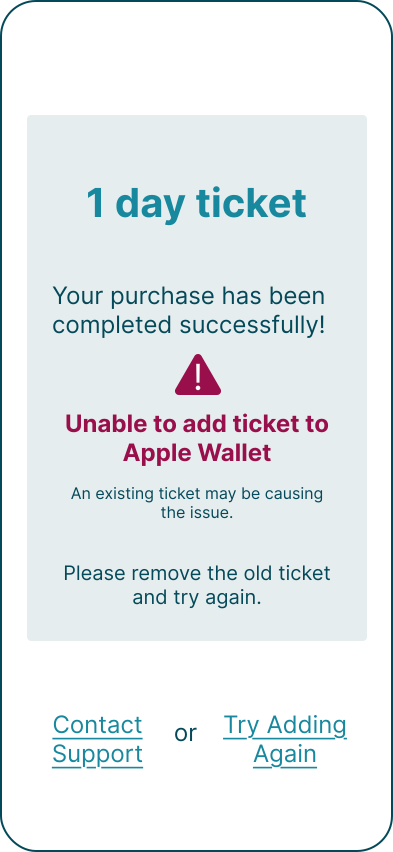
B-03 — Recovery path
Process Governance↑↓
The critical path failures documented above are not coding errors — they are gaps between analysis, development, and QA. The features were built and shipped, but no one walked the end-to-end user path to verify the flow works as intended. Two process changes prevent this:
- Analyst Sign-off for critical paths — the analyst approves the test plan for payment and purchase flows, ensuring coverage of negative scenarios such as “payment charged on wallet integration failure”. Requirements are not considered tested until the analyst confirms the negative cases are covered.
- Analyst-led scenario review — the analyst participates in product demos not as an observer, but as a reviewer validating end-to-end user flows against the intended experience. Critical path failures of this type surface reliably in demo sessions — they are rarely detected by unit or integration tests alone.
Result↑↓
User path analysis in an iterative product produces a concrete output: a structured list of improvements mapped to implementation complexity. Interim fixes close the critical failures immediately — with minimal development effort, often within a single sprint. Target solutions address the underlying architecture and go into the long-term backlog. Together, they form a prioritised roadmap for paying down product debt without stalling current development.
A transport operator in a captive market can absorb these failures silently — passengers have no alternative. For banking apps, e-commerce platforms, and any high-traffic service where users have a choice, the same critical path failures translate directly into lost conversions and churn.
Who It’s Built For
Every resident and visitor who uses a smartphone and expects a fully digital experience belongs to this audience. For the virtual card path, all of them are currently underserved.
What Was Delivered
- 3 critical path failures identified — with flow diagrams showing exactly where and why each failure occurs
- Prioritised backlog items — 3 interim fixes for the near-term sprint, 3 target solutions for the long-term roadmap
- Screen-level mockups — visualising all three improvements as concrete UI changes
- Success metrics defined — to measure improvement after each fix:
- B-01: share of users who modify the pre-filled email (baseline for friction demand)
- B-02: Wallet card creation failure rate (target: 0% silent charges)
- B-03: share of payment errors resolved in-app without contacting support